The Voxel theme is one of the most powerful WordPress themes for building dynamic, content-driven websites — directories, listings, marketplaces, communities and booking platforms — all without writing code. This guide explains what the Voxel WordPress theme is, its key features, who it’s for, pricing, how it compares to alternatives, and how to extend it with addons.
What is the Voxel WordPress theme?
Meet Voxel, a WordPress theme built by 27 Collective — the same team behind the popular MyListing directory theme. Voxel is an all-in-one framework for creating advanced dynamic websites: it bundles custom post types, conditional logic, content restrictions, memberships, bookings, maps, reviews, social feeds and multi-vendor payments into a single package. Instead of stitching together a dozen plugins, you get everything needed to build complex platforms out of the box, with full design control through Elementor.

Visit the official Voxel theme website: getvoxel.io
Who is the Voxel theme for?
Voxel shines whenever a site needs frontend user accounts, user-submitted content and monetization. Common use cases include:
- Directory and listing websites — business directories, real-estate listings, job boards, event calendars.
- Marketplaces — multi-vendor platforms with split payments, product/service listings and vendor profiles.
- Booking platforms — appointments, rentals, reservations with availability calendars.
- Membership & community sites — paid memberships, content restriction, user profiles, social timelines and direct messaging.
- Review and comparison sites — user ratings, reviews and rich filtering.
If your project involves people creating profiles, submitting posts, booking or paying each other, the Voxel theme is purpose-built for it.
Key features of the Voxel theme
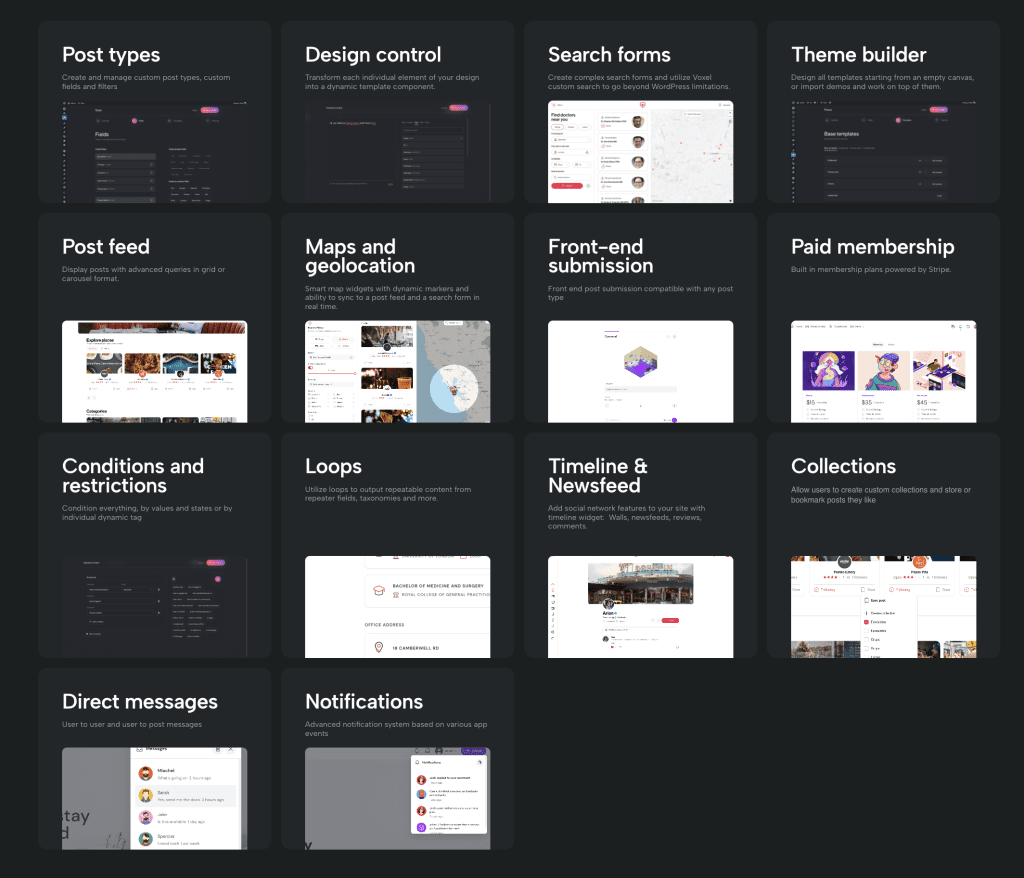
The Voxel WordPress theme packs an unusually deep feature set for a single theme:
- Custom post types & fields — model any kind of content (places, events, products, profiles) visually, no code required.
- Dynamic templates — design single, card and archive templates once and populate them dynamically with Voxel’s dynamic data.
- Advanced search & filters — keyword, taxonomy, range, location-radius and map-based search with instant results.
- Maps & geolocation — Google Maps or Mapbox integration with map cards and “search this area”.
- Memberships & paid listings — subscription plans, pay-per-listing, promotions and content restriction.
- Bookings & reservations — availability calendars, time slots and booking flows.
- Payments & multi-vendor — Stripe/WooCommerce with vendor split payments.
- Social features — activity timeline, follows, collections, reviews and direct messages.
- Conditional visibility — show or hide any element based on user role, membership, or dynamic conditions.
What builder does Voxel use?
The builder employed by Voxel is Elementor. Voxel adds a large set of dynamic Elementor widgets — search forms, post feeds, maps, cart, user bar and more — that you drag and drop into the editor. This tight Elementor integration means you design every part of the Voxel theme visually, with live dynamic data, and never touch a template file.
Can you use Voxel with Elementor Pro?
Yes. Voxel works with both free Elementor and Elementor Pro. Elementor Pro is optional, but pairing it with Voxel unlocks extra widgets, theme-builder flexibility and motion effects on top of Voxel’s own dynamic widgets — a popular combination for polished, high-converting Voxel sites.
How much does the Voxel theme cost?
Voxel is a premium theme sold through getvoxel.io, with both single-site and unlimited-site license options that include updates and support. Pricing changes over time, so always check the official Voxel theme website for the current rates. Considering it replaces multiple premium plugins (directory, membership, booking, multi-vendor), most builders find the Voxel theme excellent value.
Voxel theme vs alternatives
Voxel is the modern successor to MyListing and a strong alternative to page builders like Webflow or Framer, while keeping your data on WordPress. For a full breakdown see Voxel theme vs MyListing.
Pros and cons of the Voxel theme
Pros: all-in-one (fewer plugins), deep dynamic-content and membership features, native maps/booking/payments, full Elementor design control, active development.
Cons: a learning curve given how much it does, and — because it’s feature-rich — pages benefit from performance tuning (caching, asset optimization) and, occasionally, addons to fine-tune specific behaviors.
How to get started with the Voxel theme
- Purchase and download Voxel from getvoxel.io.
- Install the theme and Elementor, then import a Voxel demo that matches your project.
- Define your custom post types and fields (e.g. places, events, products).
- Design your single, card and archive templates with Elementor + Voxel widgets.
- Configure search, memberships, payments and booking as needed.
- Extend and refine with Voxel addons to add missing functionality.
Essential Addons for Voxel theme
To expand the functionality of the Voxel WordPress theme, explore the Essential Addons for Voxel plugin. It adds 30+ features that improve native functions and fill gaps in the Voxel theme — advanced search filters, create-post enhancements, saved searches with email alerts, listing comparison, client popups, QR codes, PWA, social logins and more.
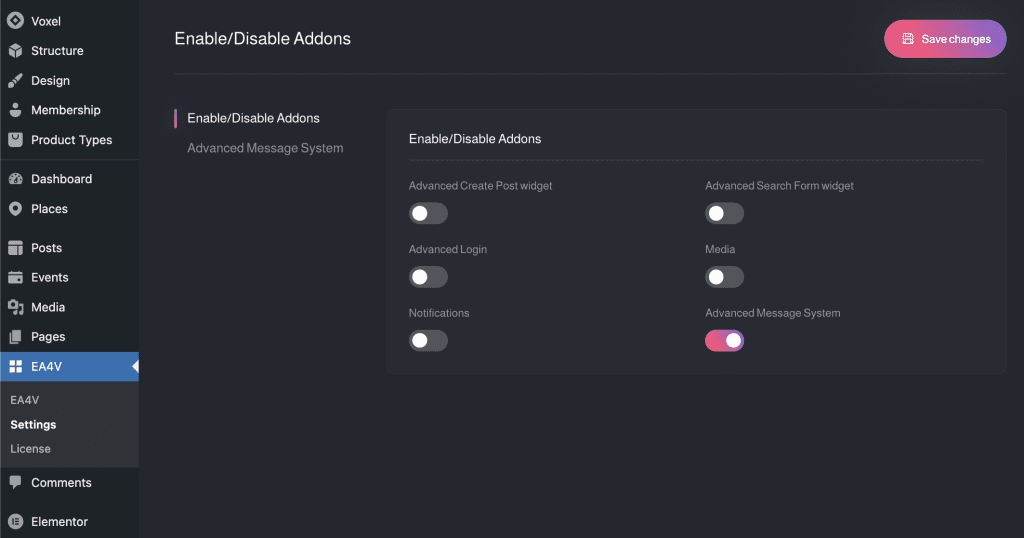
The important thing to note is that when you install this Voxel theme addons plugin, all addons are disabled by default. You enable only the specific addons you need, so you never overload your website with unnecessary features. You can also browse the Voxel addons documentation to see how each feature works.
Related Voxel theme guides
- Voxel theme review (2026) — is it worth it?
- Voxel theme vs MyListing — which to choose.
- Voxel theme tutorial — build a directory step by step.
Frequently asked questions about the Voxel theme
Is the Voxel theme good for beginners?
Voxel is beginner-friendly to start with (demo imports and visual Elementor editing), but its depth means you’ll keep learning as you build more advanced features.
Does Voxel require Elementor?
Yes — Voxel is built around Elementor. The free version of Elementor is enough to get started; Elementor Pro is optional.
Can Voxel handle memberships and payments?
Yes. Voxel includes native memberships, paid listings, subscriptions and multi-vendor payments via Stripe and WooCommerce.
Do I need addons for the Voxel theme?
Voxel does a lot on its own. Addons like Essential Addons for Voxel are optional but add popular missing features and quality-of-life improvements.
Where can I learn to use the Voxel theme?
Start with the official docs at getvoxel.io, and see the Voxel addons documentation for feature-specific guides.